
Fiduciary Accounting Software: The Buyer's Checklist (and the One Red Flag)
You ran a P&L, handed it to the attorney, and got it back with one line: this isn't the format. That's the moment most people start shopping for fiduciary accounting software — and it's also where most of them buy the wrong thing.
A court accounting is not a financial report with a different cover sheet. It's a statutory document that has to foot to the penny, allocate every dollar between principal and income, and survive line-by-line challenge from a beneficiary. Before you put money down, here's exactly what a tool has to do, where the general tools fail, and the one feature that should make you walk away.
The short version
- Four hard requirements: principal/income allocation under UFIPA, an enforced charges-equal-credits proof, the statutory court schedules for your state, and traceability from every number back to its source.
- QuickBooks, Quicken, and Excel can't do any of the four. They hold a ledger; they don't produce a court accounting.
- The red flag: any tool that says it "uses AI" to compute the numbers. The math must be deterministic — rules, not a model that can answer differently twice.
- The real decision is build vs. buy vs. done-for-you — and it turns entirely on whether your ledger is already clean.
What fiduciary accounting software must actually do
Four requirements. Miss any one and the output isn't a court accounting, no matter what the product page calls it.
1. Allocate principal from income — under UFIPA, not a hunch. Every receipt and disbursement gets split between principal and income under the Uniform Fiduciary Income and Principal Act: California Probate Code §16320 et seq.; Florida Statutes Chapter 738. Interest, dividends, and rents are generally income. The underlying assets and gains on their sale are generally principal. Fees, accruals, and distributions from entities take judgment. A tool with no native concept of this split can't produce a trust accounting — it can only produce a checkbook with extra categories. (See principal vs. income.)
2. Enforce charges-equal-credits, to the dollar. The non-negotiable proof in any court accounting: what the fiduciary started with, plus everything received, must exactly equal everything paid out plus what remains. Property on hand at the start, receipts, gains on sales, disbursements, losses, distributions, property on hand at the close — it ties out, or it doesn't. The software has to enforce and display that reconciliation in the court's structure. Balancing a bank statement is not the same thing.
3. Output the statutory schedules for your state. The numbers have to land in schedules a court accepts: a summary of account, receipts, disbursements, gains and losses on sales, distributions, and property on hand. California follows Probate Code §1061–1063, with the GC-400/405 Judicial Council forms for conservatorships. Florida follows Florida Probate Rule 5.346, with guardianships under Fla. Stat. §744.3678. A spreadsheet carrying the same totals is not a court schedule.
4. Trace every number back to its source. When a beneficiary objects to one transfer, you need an immutable path from that line in the schedule back to the statement it came from. Traceability isn't a reporting nicety — it's the difference between answering an objection in an afternoon and rebuilding the accounting under fire.
HintTest any tool against requirement #1 first. Ask the vendor to show you where a transaction gets allocated between principal and income. If the answer is "you'd use a class or a sub-account for that," it's general bookkeeping wearing a fiduciary label.
Why QuickBooks, Quicken, and Excel fall short
This is where most buyers start, and it's a reasonable place to start. General accounting and personal-finance tools are genuinely good at what they were built for: recording transactions, categorizing them, reconciling to a statement, and printing a P&L or balance sheet. For keeping a trust's books current month to month, they hold the data fine.
The fiduciary part is what they can't do. There's no setting in QuickBooks, Quicken, or Excel to allocate transactions between principal and income, no built-in §1061 summary or Fla. Prob. R. 5.346 accounting, and no charges-equal-credits proof laid out the court's way. So people export to a spreadsheet and hand-build the schedules. That's slow, error-prone, and risky the moment a beneficiary or a judge is reading the result. We go deeper in Can QuickBooks do a trust or court accounting?
| Capability | General tools (QuickBooks / Quicken / Excel) | Purpose-built fiduciary software |
|---|---|---|
| Record, categorize, reconcile to a statement | Yes | Yes |
| Print a P&L / balance sheet | Yes | Yes |
| Principal vs. income allocation (UFIPA) | No | Must-have |
| Charges-equal-credits proof, court structure | No | Must-have |
| §1061–1063 / GC-400/405 / Fla. R. 5.346 schedules | No | Must-have |
| Line-level traceability to source documents | No | Must-have |
| Deterministic, repeatable math | Yes | Must-have |
| Reconstruct messy, multi-year, commingled records | No | Rarely — assumes a clean ledger |
| Keep books current after the accounting | Yes | Nice-to-have |
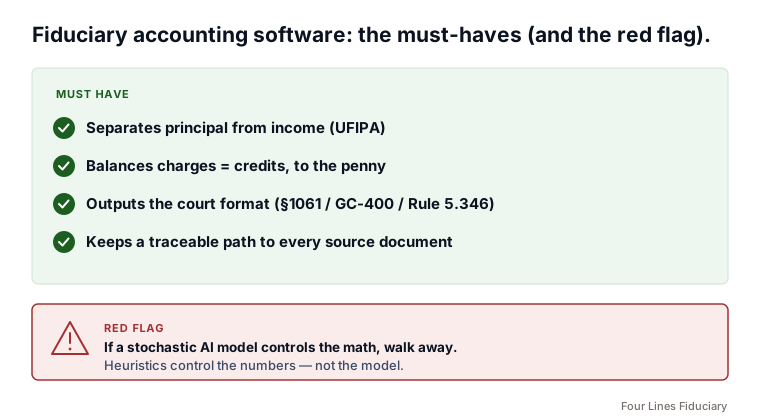
The red flag: software that "uses AI" for the numbers
Vendors have figured out that "AI-powered" sells. In fiduciary accounting, applied to the math, it's a warning label, not a feature.
The math behind a court accounting is deterministic: one balanced answer that ties to the penny, where a judge can challenge any single line and you can defend it. A large language model is stochastic by design — ask it the same question twice and it can answer differently; ask it a slightly different way and you get a different number. The best a stochastic tool can do is produce outcomes with confidence limits. It cannot natively produce a deterministic, defensible document. A model that's "99% right" is still wrong, because the one unexplained transfer is exactly what a hostile beneficiary builds a surcharge claim around. Integrity tasks don't degrade gracefully. They tie out or they don't.
That doesn't mean AI has no place. It means knowing which jobs it's allowed to touch:
- Good uses of AI: reading a stack of statements into structured data, first-pass categorization flagged with confidence, suggesting the grey-area principal/income calls for a human to confirm, wiring already-balanced data into report views.
- Where AI must never have the wheel: the footing and tracing, and the final allocation that has to balance. That's deterministic code — rules and heuristics — with a credentialed human owning the judgment calls.
Watch outAsk the vendor one question: "Does a language model compute the balances, or do deterministic rules?" If the model controls the arithmetic, the output can change between runs and can't be defended line by line in front of a judge. "We use AI for the numbers" is a reason to walk, not a reason to buy.
Build vs. buy vs. done-for-you
Once you know what the software has to do, the decision isn't really about features. It's about the state of your records — and there are three honest paths.
- Build it yourself (Excel + your own rules). Cheapest in dollars, most expensive in hours and risk. You're hand-coding the principal/income logic and the charges-equal-credits proof, and you own every error. Defensible only if you genuinely know the §1061 format and have the time. Most DIY attempts stall in the reconstruction, not the format.
- Buy dedicated software. Capable fiduciary accounting software genuinely exists. Thomson Reuters ONESOURCE Fiduciary Accounting, GEMS (Gillett Estate Management Suite), and TEdec all produce court-format accountings to the National Fiduciary Accounting Standards — ONESOURCE even ships California §1061 and Florida Rule 5.346 formats out of the box. These are the real deal. The catch is who they're built for: trust departments, banks, and large T&E firms, at enterprise prices — ONESOURCE runs into several thousand dollars a year, scaling with your case count. And the part most buyers miss: every one of them still assumes you feed it a clean, correctly classified ledger. They format; they don't reconstruct years of messy statements for you.
- Done-for-you (a preparer or a service). You hand off the reconstruction and the format and own only the judgment calls and the client relationship. Right answer when the records are a mess or a deadline is close.
The big boys are real — and priced like it If you run a trust department with a hundred matters, ONESOURCE or GEMS earns its keep. If you're one executor with one estate and a box of statements, that same platform means buying institutional software, learning its fiduciary model, and still owing the 90% it won't do — turning the mess into a clean ledger. The tools aren't the problem; the fit and the price are. For a single matter, the math rarely works.
The hinge for all three is one question: is your ledger already clean?
The court format is roughly the last 10% of the job. Turning a box of multi-year statements, commingled accounts, and gaps into a clean ledger with principal and income properly separated is the other 90% — and no tool does that part by itself. (See how a trust accounting is prepared; the work hides in the reconstruction.) If your books are current and clean, buy software or hire a preparer to format them. If you're staring at years of raw statements, an overdue filing, or accounts that were never reconciled, buying and learning a tool hands you a tool that still needs a clean ledger you don't have.
How Four Lines fits
For people who'd rather have it done than buy and learn software, that's what we do. Send whatever you have — a QuickBooks export, bank and brokerage statements, Quicken, or Excel. Orchestrated extraction models structure the raw data, deterministic code foots and reconciles it, and a fiduciary-accounting specialist reviews every allocation. The arithmetic is never left to a model. We deliver the accounting in the format your court accepts, plus clean GAAP financial statements and the workpapers behind every number. QuickBooks integration is on the way for clients who want their cleaned-up books to stay current afterward.
We scope every engagement before you commit a dollar, and we quote a flat fee — never a blind hourly quote. Send us what you have and we'll tell you exactly what it will cost to make it court-ready.
Common questions
What's the single most important feature?
Native principal/income allocation under UFIPA. It's the core of a trust accounting, and it's the one thing general tools have no concept of. If a tool can't show you where that split happens, it can't produce a court accounting.
Is "AI-powered" fiduciary software a good thing?
Only if AI is kept away from the math. The numbers in a court accounting must be deterministic — they have to balance to the penny and survive line-by-line challenge. A model that computes balances can answer differently between runs. AI is fine for reading statements and first-pass categorization; it should never own the arithmetic.
Will dedicated court-accounting software solve my problem?
The established tools — ONESOURCE Fiduciary Accounting, GEMS, TEdec — genuinely produce court formats (ONESOURCE includes CA and FL). But they're priced for trust departments and larger firms, often several thousand dollars a year, and still assume a clean, correctly classified ledger. They won't turn a box of messy, multi-year statements into that ledger. The format is the last 10%; the cleanup is the 90%.
Should I build it in Excel, buy a tool, or hand it off?
It depends on one thing: whether your ledger is already clean. Clean books — buy software or hire a preparer to format them. Messy records, an overdue filing, or commingled accounts — you need reconstruction first, which is done-for-you territory.
This is general information, not legal or tax advice, and not an attorney or CPA engagement. Software capabilities and court requirements change; confirm specifics with your attorney or the court.
Rather have it done than buy and learn a tool?
Send us what you have and we'll tell you exactly what it costs to make it court-ready. Free scope, flat fee before you commit a dollar.